The best forex backtesting software depends on one question: do you test a discretionary, chart-read strategy, or a set of exact rules? Discretionary traders need a bar-replay simulator that executes trades and keeps the record. Rule-based traders need an automated tester. This Q4 2026 comparison covers eight tools across both camps, with every price checked against the vendor's own page on 4 October 2026.
Key takeaways
- Best free manual tool: a browser replay simulator with a real free plan - FxBacktest, or FX Replay's capped Beginner tier.
- Best pay-once: Forex Tester's lifetime licence for manual and tick-data work; Backtrex's for no-code automated tests.
- Best for coded EAs: the MetaTrader 5 strategy tester, free with any broker.
- Watch the hidden limit: TradingView lets you trade in bar replay, but it does not save the trades or the result.
Quick picks by trader type
The scorecard: 8 forex backtesting tools compared
| Tool | Method | Runs on | Free option | Cheapest paid | Saves stats |
|---|---|---|---|---|---|
| Forex Tester | Manual + automated | Browser (Online) | Demo, cannot save | €169 once (€135 promo) | Yes |
| FX Replay | Manual replay | Browser | 2 sessions, 1-week retention | $17.99/mo or $180/yr | Yes, per plan retention |
| TradingView | Replay + Pine Script | Browser, app | Daily-chart replay only | $14.95/mo for intraday | Replay trades not saved |
| Soft4FX | Manual replay | MT4/MT5 plugin, desktop | Demo, 5 trades per test | $109 once + tax | Yes |
| MT5 strategy tester | Automated (EA) | MetaTrader desktop | Free | Free | EA reports |
| TradeZella | Manual + no-code auto | Browser | None listed | $26/mo yearly ($35 monthly) | Yes |
| Backtrex | No-code automated | Browser | Guided tour | €69 once | Yes |
| FxBacktest | Manual replay + script | Browser, phone | 105 markets, 3 saved sessions | €12/mo | Yes, no retention timer |
Prices from each vendor's own page, 4 October 2026 (TradingView and Forex Tester 3 October). Promotions and regional pricing change often - check the source before you pay.
What three years of backtesting costs
Monthly prices hide the real comparison. A backtesting habit runs for years, so here is the cheapest plan that replays intraday and keeps your results, carried over three years:
Subscriptions at yearly billing × 3; lifetime licences at list price before promotions. *TradingView at the monthly price × 36, and it does not save replay trades. Backtrex Pro holds 3 years of data and caps 20 backtests a day; Soft4FX needs MetaTrader; the MT5 tester needs code.
Two things stand out. The lifetime licences are cheap if you stay with backtesting - and expensive if you quit in month two, which most people who buy software in their first month of testing do. And the most expensive option here is a journal, not a backtester: TradeZella's price buys its live-trade journal, with backtesting included.
Two kinds of tool for two kinds of trader
Almost every product falls into one of two camps, and picking the wrong camp is the most common way to waste money here. See manual vs automated backtesting for the full breakdown.
| Manual bar replay | Automated tester | |
|---|---|---|
| You provide | Your judgement, bar by bar | Exact rules, as code or words |
| Tests | The trader and the rules | The rules only |
| Speed | About 100 trades in a few evenings | Years of data in seconds |
| Main risk | Recognising the chart (hindsight) | Curve-fitting the rules |
| Suits | Price action, SMC, structure, news | Indicator and rule-based systems |
| Tools here | FxBacktest, FX Replay, Soft4FX, Forex Tester, TradingView replay | MT5 tester, Backtrex, TradeZella, Forex Tester, Pine Script |
The eight tools below are numbered for reference, not ranked. The right one depends on which camp you are in, so each closes with a verdict on who it fits. Jump to one:
1. Forex Tester - pay once, test deep
Forex Tester has been the reference backtesting product since the mid-2000s and now runs in the browser as Forex Tester Online. It does manual and automated testing, carries up to 23 years of tick data per symbol, and on Pro adds trading robots, an exit optimizer that searches stop and target combinations, and a blind mode that disguises the chart so you cannot recognise it. It still sells lifetime licences: on 3 October 2026, Starter at €169 and Pro at €299 before promotion (€135 and €239 on promotion). Starter covers 80 symbols and Pro 283. The free option is a demo with one month of data that cannot save a project - see is Forex Tester free.
2. FX Replay - the widest browser platform
FX Replay runs the manual replay loop in the browser and casts the widest net here: 120+ forex pairs, futures with CME data, stocks, indices and commodities, major-pair history back to 2003 and seconds-level candles on Pro, plus scripting, an AI assistant and a prop firm simulator. The free Beginner tier allows 2 sessions, 1 indicator and one week of data retention; Intermediate ($17.99 a month or $180 a year) raises that to 10 sessions, 3 indicators and six months; Pro ($35 or $350 a year) removes the limits. Breakdown in is FX Replay free, and head to head in Forex Tester vs FX Replay.
3. TradingView - the best charts, a forgetful replay
TradingView has the best charts in the business. Its Bar Replay lets you step through history and - since it added trading to replay - place market, limit and stop orders on past bars. The catch is in TradingView's own help: trades and the overall result exist only within that replay session and are not saved anywhere. The free Basic plan replays daily charts and above only; minute replay starts on Essential at $14.95 a month with 180 days of history, and all of it needs Premium at $69.95. Pine Script strategies can be tested automatically on any plan, if you write the code. Limits in full: TradingView bar replay free limits; against a dedicated tool: FX Replay vs TradingView.
4. Soft4FX - replay inside MetaTrader
Soft4FX Forex Simulator is a plugin that turns MetaTrader into a manual trading simulator, so you replay history in the platform you may already trade live. The lifetime licence is $109 plus tax, includes both the MT4 and MT5 versions and 10 to 20 years of tick data, and carries a 14-day money-back guarantee. The free demo is limited to 5 trades per simulation and 2 sample years. The friction is everything around it: a desktop MetaTrader install and a broker login. Full breakdown in the Soft4FX alternative guide.
5. MT5 strategy tester - free, but built for robots
The strategy tester ships free inside MetaTrader 5 (and in simpler form in MT4), and for coded expert advisors it is genuinely good: tick modelling, multi-currency tests, and a built-in optimizer. The catch is that there is nothing to test until you write or buy an EA, and stepping through a chart to trade by hand is not what it was built for.
6. TradeZella - a journal that backtests
TradeZella is a trading journal that imports your live broker trades, and it has added manual and no-code automated backtesting on top. Every plan includes manual backtesting (10 strategies on Essential, unlimited above); trade replay and automated runs start on Pro, at 10 runs a month, with 100 on Ultra. Data covers stocks, futures, crypto and CFDs over 11+ years. There is no free plan listed: Essential is $35 a month or $26 billed yearly, Pro $59 or $44, Ultra $99 or $74. Plan by plan in TradeZella backtesting.
7. Backtrex - no-code automated, pay once
Backtrex runs automated backtests without code: import a Pine Script strategy or describe the rules in plain language, and it tests them on M1 to D1 data in the browser. Pro is €69 once with 3 years of data and 20 backtests a day; Max is €179 once with 10 years and no daily caps. Both rise after licence number 125, by €20 and €30. Its marketing promises close agreement with live results - treat that, like any vendor's claim including ours, as a claim until the method is published. More in the Backtrex alternative guide.
8. FxBacktest - free browser replay with real stats
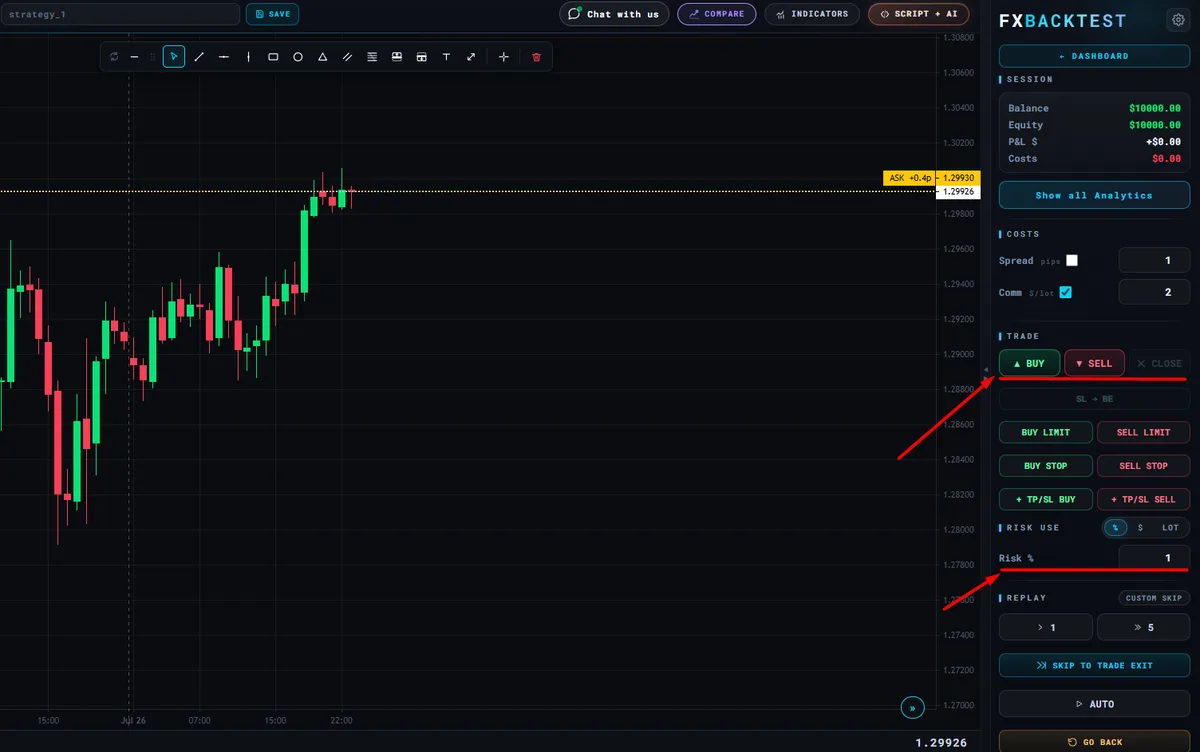
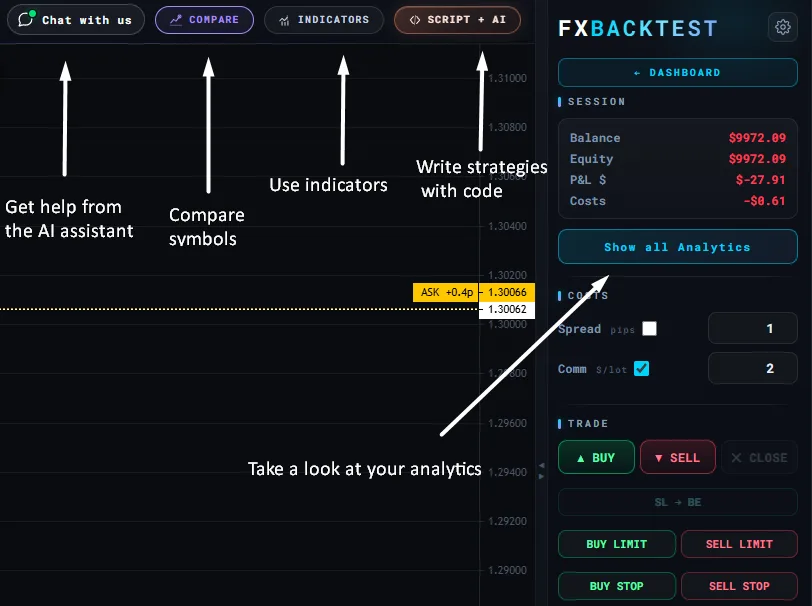
Our own tool exists because manual traders wanted replay plus execution, sizing and statistics, without an install or a subscription to start. FxBacktest runs in the browser, phone included, with 105 instruments - forex, metals, energy, indices, crypto and stocks - all on the free plan. You drag the stop and target on the chart and the lot size follows from your risk, with an economic-calendar overlay, multi-timeframe panes and a full session report. For rule-based ideas there is FXScript with an optimizer and an AI assistant that writes the script from plain English.
Honest limitations: no futures and no seconds candles, no tick data inside the one-minute bar, and it needs a connection. Minute history is the shortest timeframe on most instruments; the deep minute archive back to 2016 covers four markets (EUR/USD, GBP/USD, gold and the Nasdaq) on Ultra at €39. The free plan keeps 3 saved sessions and 1 indicator at a time, and nothing saved is deleted on a timer.
Disclosure: FxBacktest is our own product. It is listed last rather than first, and its limitations are stated as plainly as everyone else's.
Also considered
- TradingSim - replay for US stocks, futures and crypto, with no forex. See the TradingSim alternative guide.
- TradesViz - a trading journal whose simulator, on paid plans, replays 5-second bars from mid-2021. See the TradesViz alternative guide.
- NinjaTrader Market Replay - strong for futures traders already on NinjaTrader; not built around forex, and Windows-only (running it on a Mac).
Where each tool stands in Q4 2026
Most "best of 2026" lists were written in January and still quote last year's plans. This is the state of each tool as of early October 2026:
| Tool | State in October 2026 | Why it matters |
|---|---|---|
| TradingView | Orders can be placed inside Bar Replay | Often reported as "no trading in replay" - that is out of date. The real limit is that results are not saved after the session. |
| TradeZella | No-code automated backtesting on Pro and Ultra | A journal competing with automated testers, with metered runs: 10 a month on Pro. |
| Backtrex | Numbered lifetime licences | Prices step up after licence #125, so the €69 entry price is temporary. |
| FX Replay | Intermediate at $17.99 | The middle tier keeps work for 6 months; the free tier deletes after a week. |
| Forex Tester | Lifetime licences on near-permanent promotion | €135 and €239 on promotion against €169 and €299 list. |
| FxBacktest | 105 instruments; minute data to 2016 on four markets | ETFs, bonds and 20 more forex pairs added in September 2026; deep M1 on Ultra since 25 September. |
How to choose in three questions
| If you… | Then look at |
|---|---|
| Trade by reading the chart and want to start free | FxBacktest, or FX Replay's free tier for a trial |
| Will backtest for years and prefer to pay once | Forex Tester (manual + tick) or Backtrex (no-code automated) |
| Trade futures or stocks alongside forex | FX Replay Pro, or TradingSim for US stocks |
| Have rules as code | MT5 strategy tester, or TradingView Pine Script |
| Want a live-trade journal too | TradeZella or TradesViz |
| Already live inside MetaTrader | Soft4FX |
Whatever you pick, run at least 100 trades on one setup before you trust the numbers, and stay with one tool for a full quarter. Comparable, accumulated data under one cost model beats a marginally better feature list.
What actually separates good backtesting software
- Data depth - enough history to cover different market conditions. Two years is one regime.
- Realistic costs - the simulation must charge spread and commission, or marginal strategies look profitable.
- Sizing that matches your risk - if you risk a fixed percent live, the tester should size from the stop distance the same way.
- Stats you can act on - win rate, average R, maximum drawdown and expectancy per trade.
- A record that survives - sessions you can store, compare and journal against. A tool that forgets your trades, or deletes them after a week, cannot hold a 100-trade sample.
Common mistakes when choosing
- Buying before defining the strategy - write down one setup with entry, stop and target rules first; the right camp becomes obvious.
- Confusing replay with testing - scrubbing bars without a saved record produces impressions, not evidence. Impressions are how bad strategies survive.
- Paying for resolution you don't trade - tick data matters for stops a few pips wide; on H1 and above it is cost without benefit.
- Buying a year in month one - prove the habit on something free, then buy the tool that fits the habit you actually have.
Measured: the depth-versus-granularity trade-off every tool makes
No tool stores every timeframe to the same depth. Finer data costs far more to hold, so every product makes a trade-off - and it is the question to put to any tool you evaluate. Here is ours, counted from the archive manifest on 4 October 2026, for a deep-minute market and a standard one:
| Timeframe | EUR/USD: starts | EUR/USD: bars | USD/JPY: starts | USD/JPY: bars |
|---|---|---|---|---|
| M1 | Jan 2016* | 3,979,095 | Apr 2026 | 134,069 |
| M5 | Jan 2016* | 773,325 | Apr 2025 | 100,000 |
| M15 | Jan 2016 | 249,622 | Jul 2022 | 100,000 |
| M30 | Jan 2016 | 124,929 | Jul 2018 | 100,000 |
| H1 | Jul 2010 | 100,000 | Jul 2010 | 100,000 |
| H4 | Apr 2010 | 26,583 | Jun 2010 | 26,221 |
| D1 | Apr 2010 | 5,159 | Jun 2010 | 5,089 |
FxBacktest archive manifest, 4 October 2026. *Free and Pro replay the latest 6 months of M1 and 9 months of M5 on the four deep-minute markets; Ultra replays all of it. Every other cell is free.
On a standard market, roughly 100,000 bars buys six months at M1 but sixteen years at H1. That is the real shape of the trade-off. H1 is the sweet spot for most strategies: fine enough to place a realistic stop, deep enough to cross several regimes. Use M1 for what it is uniquely good at - deciding whether a stop or a target was hit first inside one candle - rather than as the base for a multi-year test it cannot hold.
Best Backtesting Software FAQ
What is the best forex backtesting software?
It depends on how you trade. For discretionary, chart-based traders, a manual bar-replay simulator that saves trades and stats - FxBacktest for free, Forex Tester to pay once, FX Replay for the widest markets. For coded rules, the MT5 strategy tester (free) or Backtrex (no-code, lifetime licence).
Is there a free forex backtesting app?
Yes. FxBacktest's free plan runs in the browser, including on a phone, with 105 instruments, every timeframe, trade execution and a full report. FX Replay has a free tier capped at 2 sessions with one week of retention, TradingView's free plan replays daily charts only, and the MT5 strategy tester is free for coded EAs.
How much does forex backtesting software cost?
From free to about $99 a month. As of 4 October 2026: Backtrex from €69 once, Soft4FX $109 once, Forex Tester from €169 once, FX Replay $17.99-$35 a month, TradingView intraday replay from $14.95 a month, TradeZella $35-$99 a month, and FxBacktest free or €12-€39 a month.
Does TradingView have real backtesting?
Partly. You can place orders inside Bar Replay, but TradingView states that replay trades and the overall result exist only within that session and are not saved. Pine Script strategies can be backtested automatically, but that requires coding the rules.
Do I need tick data to backtest forex?
Only if your strategy lives inside the candle - scalping with stops a few pips wide, where the order of ticks decides whether the stop or target was hit first. For swing and intraday strategies on M15 to D1, clean OHLC bars are enough.
Is manual or automated backtesting better?
Automated testing suits exact, coded rules - it runs thousands of trades without bias. Manual replay suits discretionary strategies because it tests the trader as well as the rules. More in manual vs automated backtesting.
Can I backtest forex on my phone?
With a browser-based tool, yes. Desktop tools such as Soft4FX and the MetaTrader strategy tester need a computer with MetaTrader installed. FxBacktest has a dedicated phone layout for replay and trade entry; a larger screen is still more comfortable for long sessions.
Sources
- Forex Tester — plans and data — lifetime prices, demo limits, symbol counts and tick-data depth, read 3 October 2026.
- FX Replay — pricing — tier prices, sessions, indicators and retention, read 4 October 2026.
- TradingView — trading in Bar Replay — order types in replay, and that results are not saved.
- Soft4FX — pricing — lifetime price, demo limits and data, read 4 October 2026.
- TradeZella — pricing — plans, backtesting limits and replay, read 4 October 2026.
- Backtrex — pricing — lifetime licences, limits and licence-number price steps, read 4 October 2026.
- MetaQuotes — MetaTrader 5 Strategy Tester documentation — how MT5 models ticks, spread and execution.
- 17 CFR § 4.41 — CFTC rule on hypothetical performance — the source of the standard warning that simulated results are "designed with the benefit of hindsight".