Free Forex Backtesting Software:
Every Option Compared
Free tools now cover the whole manual loop - replay, trade, and read your stats - without a licence or a data subscription. This is where that stops being enough, which limits are real rather than marketing, and what paying actually buys a discretionary trader.

 Price data from Dukascopy
Free forex backtesting software is now good enough for the whole manual loop: replay historical bars, place trades by hand, and read a full performance report - no licence, no install, no data subscription. You only pay when you need bulk automated testing, which most discretionary traders never do.
- 105 symbols
- 9 timeframes
- 86 indicators
- 28 backtest analytics
- Custom bar replay
- Compare symbols
- AI scripting
- Strategy optimization
- Pattern game
- Economic calendar
- Community backtests
- Multi-strategy stats
- MT5 EA analytics
- Free course
- Trade journal + tags
- Prop firm challenges
- 7 candle types
What "free" should include
A free tool worth using has to cover the full backtesting loop, not just show you a chart. Look for these:
- Bar-by-bar replay - step through history so you cannot see the future, the core of honest manual backtesting.
- Real trade placement - open and close positions with a proper stop loss and take profit, not just annotations.
- Position sizing - auto lot sizing from your risk, so the test reflects real risk management.
Where free beats paid
Free browser tools win decisively on friction: nothing to download, works on a locked-down work laptop, and no data to source. Paid desktop software only pulls ahead when you need to run a coded strategy across thousands of trades automatically - see do you need paid software.
Every genuinely free way to backtest, compared
| Option | Replay | Real trade placement | Auto stats | Setup effort | The catch |
|---|---|---|---|---|---|
| FxBacktest free tier | Bar by bar | Drag TP/SL, auto lots | Full report | Sign up, pick a chart | Saved-session and per-session trade caps |
| TradingView free replay | Limited depth/timeframes | Annotations only | None | None if you have an account | No P&L - you eyeball results |
| MT4/MT5 strategy tester | Visual mode | Coded EAs only | EA report | Install + broker account | Must code the strategy first |
| Broker demo account | Live time only | Real platform | Statement | Register with broker | 1 trade setup per day vs 50 in replay |
| Spreadsheet + screenshots | Manual scrolling | Log by hand | You compute | High discipline cost | Slow, error-prone, easy to cheat |
The free options, one by one
- Complete free loop
Browser simulators - the complete free loop
A browser bar-replay simulator is the only free option that covers the entire loop: honest replay, real order placement with stop and target, position sizing from the stop distance, and a report with the numbers that matter. FxBacktest's free tier includes the full loop across 105 instruments; the caps sit on saved sessions and advanced analytics, not on your ability to test. That structure matters - a free tool that blocks trade placement or hides your stats is a trial, not a tool. - Charts only
TradingView's free replay - charts without consequences
TradingView's bar replay is available on free plans with limits on how far back and which timeframes you can replay. It is genuinely useful for rehearsing market structure - but nothing you do in replay is executed, priced, or scored. Without spread costs and P&L, marginal strategies look better than they are, which is exactly the bias backtesting exists to remove. - For coders
MT4/MT5 strategy tester - free power for coders
If your rules are objective enough to code, the tester built into MetaTrader is free and thorough. The cost is prep: install the platform, get a broker demo login, and write or commission the EA. For a discretionary trader that is the wrong tool - visual mode can step charts, but manual order entry against replayed history is clumsy at best. - Live speed
Demo accounts - practice, not backtesting
A demo account trades live markets at live speed, so it produces one data point per setup per day. That is forward practice, not backtesting - valuable later, but far too slow for proving an edge. Fifty trades that take three months on demo take an afternoon in replay.
The hidden costs of "free"
Three things to check before committing hours to any free tool:
- Does it charge realistic costs? If the simulation ignores spread and commission, every scalping strategy tests profitable and fails live.
- Can you keep your work? Sessions you cannot save cannot be journaled or compared, and the learning evaporates between sittings.
- Does it prevent cheating? Honest replay hides future bars. If you can peek ahead - or scroll a static chart and "would have" your entries - the results flatter you. That is the most common backtesting mistake.
Free doesn't mean flimsy: the limits on good free tiers are usually saved-session counts or advanced analytics, not the ability to backtest. You can run a complete, statistically meaningful test for $0.
What a complete free backtest actually looks like
That full loop - load a market, replay it bar by bar, place trades with a real stop and target, then read the stats back - is what FxBacktest gives away on the free tier. No install, no card, and the same prepared historical archive the paid tiers use, so nothing you learn on the free plan has to be relearned later.
To make "the free loop is enough" concrete, here is the full workflow, end to end, at zero cost. First, write the strategy down - one entry pattern, one stop rule, one target rule. An untestable strategy is the real reason most backtests stall, not tooling. Second, open the simulator on the pair you trade most and jump to a random historical date so you cannot subconsciously pick a favourable stretch. Third, step through the chart bar by bar and take every setup that meets your written rules - skipping ugly ones is selection bias, and it quietly inflates every stat you produce. Fourth, let the tool size each position from a fixed 1% risk so the results reflect the risk model you would trade live. Fifth, after 100+ trades, read the report: expectancy per trade, profit factor, max drawdown, and the shape of the equity curve.
At that point you hold something most traders never produce with paid software: a written strategy with a measured verdict. Either the expectancy is positive - and you move to forward testing - or it is negative and you just saved months of live losses. Both outcomes are wins, and neither cost a cent.
When free genuinely stops being enough
Honesty requires naming the ceiling. Free browser tools stop being enough in three specific situations. If you code strategies and need to sweep parameters across thousands of runs, you need an automated tester - that is a different product category, not a bigger free tier. If your strategy's stop is a few pips wide, bar data cannot tell you whether price hit your stop or target first inside the candle, and tick-level desktop tools earn their subscription. And if you need to test instruments no free tool carries - exotic crosses, niche futures - bring-your-own-data desktop software is the only route. Notice what is not on this list: chart quality, indicator count, session limits. Those are conveniences, and paying for convenience before the edge is proven is backwards - see do you need paid software for the full decision.
Decoding free-tier limits before you commit hours
Free tiers are not all shaped the same, and the shape decides whether the tier is genuinely usable. Limits on storage - how many finished sessions you can keep - are the fairest kind: your current test is never interrupted, you just curate what you archive. Limits on analytics depth - advanced report sections behind a paid tier - are also fair, since win rate, expectancy, and drawdown remain visible and those are the verdict numbers. The limits to walk away from are the ones that break the loop itself: trials that expire mid-test, tools that block trade placement until you pay, or "reports" that show a teaser and paywall the actual numbers. A useful rule before investing a weekend: check whether the free tier lets you finish one complete 100-trade test and read its full core stats. If yes, the tier is real. If the answer requires a card number, the word "free" is doing marketing work, not describing the product.
It is also worth checking what happens to your data when you do upgrade or downgrade - saved sessions that survive tier changes mean your testing history stays one continuous dataset, which matters more the longer you test.
Getting started in one sitting
Open a no-code simulator, pick a pair like EUR/USD, and step through the chart taking every trade your rules allow — the step-by-step version of that loop is how to backtest a trading strategy free, online. Aim for 100+ trades across trends and ranges, then read the report. That is a complete, free backtest - the same loop paid tools charge for. Prefer a deeper dive on the free tier? See what the free plan includes below.
Bottom line
Free forex backtesting stopped being a compromise the moment browser simulators started executing trades and computing stats. The complete loop - honest replay, real orders with costs, risk-based sizing, and a report with expectancy, profit factor, and drawdown - is available at zero cost, which moves the entire burden of proof onto paid tools: they must name a specific capability you specifically need. For coded automation, tick fills, or offline work, they can. For everything a discretionary trader does weekly, they cannot. Start free, test one written strategy to a 100-trade verdict, and let the evidence - not the software budget - decide what happens next.
Measured: how much history a free tool actually has to give you
"Free" is worthless if the data stops two years back. The usual failure of free backtesting is not the interface — it is depth of history. For transparency, here is exactly what sits behind the FxBacktest free tier, counted from the archive itself:
| Instrument group | Count | History starts | Hourly bars held |
|---|---|---|---|
| FX majors | 6 | 2010 | ~100,200 each |
| FX crosses | 9 | 2010 | ~100,200 each |
| Metals (gold, silver) | 3 | 2009 | 20,140-100,184 |
| Indices (US30, US500, US100, GER40) | 4 | 2013 | 68,639-71,372 |
| Crypto (BTC, ETH) | 2 | 2017 | 68,561-71,790 |
| Stocks (AAPL, NVDA, TSLA) | 3 | 2017 | 5,455-16,789 |
| Energy (Brent) | 1 | 2010 | 81,565 |
| Total | 28 | 2009 | 2,199,262 |
That is 2.2 million hourly bars across 28 instruments, with the majors reaching back to 2010 — roughly 16 years, or about 6,230 hourly bars per instrument per year. The depth matters more than the instrument count: 16 years spans the 2015 franc shock, the 2016 referendum, the 2020 crash and the 2024-25 gold run, so a strategy can be tested against genuinely different regimes rather than one recent stretch.
What free tiers legitimately restrict is saved sessions and per-session trade caps, not history depth. When you compare free options, ask for the start year per instrument — it is the number that decides whether the tool can answer your question at all, and it is the one most often left off marketing pages.
Counted 2026-08-27 directly from the FxBacktest OHLC archive (28 instruments, 2,199,262 hourly bars, earliest bar 21 July 2009 on XAUUSD). Data is derived from Dukascopy tick data and refreshed nightly.
Inside the FxBacktest free backtesting simulator
Everything above is the general case. Here is the specific one — what our own free backtesting simulator gives you, free forever, with no card on file and no timed trial. The free tier runs the complete bar-by-bar replay engine across all 105 instruments and all seven timeframes. The caps sit on saved sessions and advanced analytics, never on your ability to place a trade or read your numbers.
What the free tier unlocks
- All 105 instruments — FX majors and crosses, indices, gold, silver, crypto and stocks. No chart sits behind a paywall.
- All 7 timeframes (M1 → D1) — scalping setups on M1 and M5, intraday plays on M15 and H1, swing entries on H4 and D1, switched freely mid-replay.
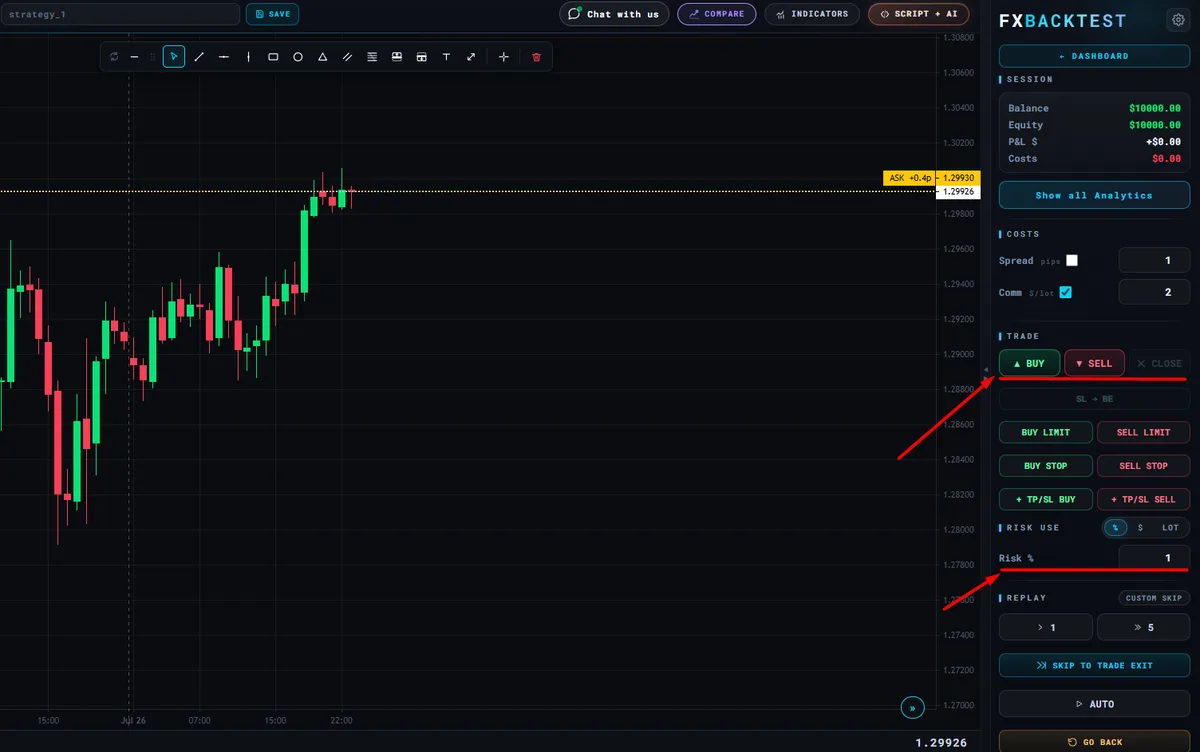
- Full manual trade execution — drag the TP and SL lines, set risk as a percentage of balance, then click Buy or Sell. Lot size is auto-calculated from the stop distance to match the configured risk, exactly like a real platform.
- Bar-by-bar chart replay — step forward one bar at a time or hit auto-play to simulate a live session on historical data, with zero install.
- One indicator at a time — moving averages, RSI, Bollinger Bands and more, to test how a single tool changes your entries before stacking confluence layers.
- Three saved sessions — revisit equity curves and trade lists and compare strategies side by side without losing work between visits.
The end-of-session report, included free
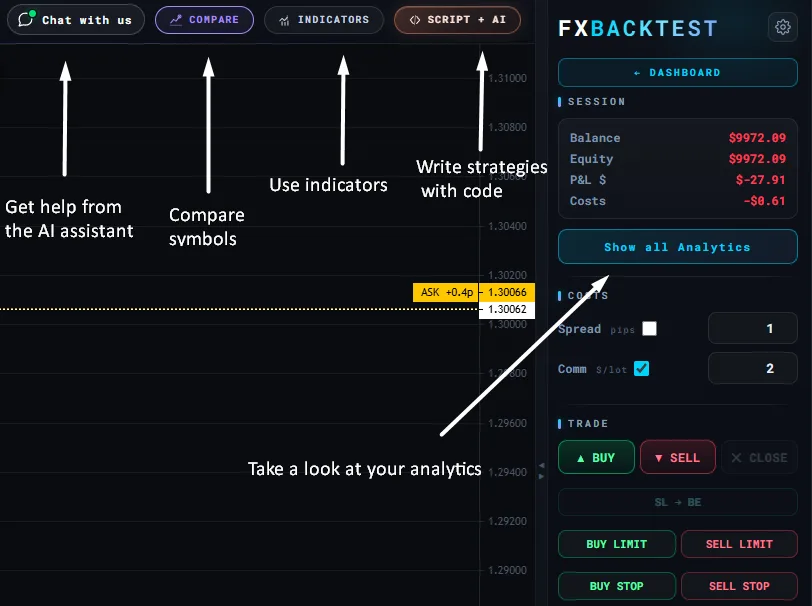
After every session the simulator builds a complete trade report, so you read your numbers the way a prop firm risk desk would — without exporting CSVs, opening spreadsheets, or buying analytics software separately.
- Overall score and profit factor — one performance score plus profit factor, Sharpe ratio and expected payoff.
- Win rate, average RR and expectancy — the four numbers that actually decide whether a strategy is worth trading live.
- Max drawdown in dollars and RR — plus gross profit and gross loss, so you see the worst stretch before live capital does.
- Consecutive wins and losses — longest streaks and average trade duration, showing how long the strategy can stay underwater.
- Balance and equity curve — the shape of the run trade by trade, not just the final number.
- Downloadable session report — save it as an image for your journal or a review, without retyping a number.
Free vs Pro vs Ultra
The free plan is the full simulator, not a crippled demo. Pro and Ultra exist for traders who want multi-timeframe analysis, more indicators, a bigger journal, and advanced analytics such as RR optimisation and session performance.
| Feature | Free | Pro | Ultra |
|---|---|---|---|
| Instruments | All 105 | All 105 | All 105 |
| Timeframes | All 7 (M1 → D1) | All 7 | All 7 |
| Manual trade execution | Yes | Yes | Yes |
| Indicators | 1 at a time | Up to 3 | Unlimited |
| Saved sessions | 3 | 30 | Unlimited |
| Trades per session | Capped | 600 | Unlimited |
| Full session report | Yes | Yes + RR slider | Yes + session & tag analytics |
| Price | $0 forever | From €12 / mo | From €39 / mo |
Free Backtesting Software FAQ
Is there free forex backtesting software?
Yes. Free browser-based simulators let you replay historical charts, place trades manually with drag-to-set stop loss and take profit, and read a full performance report - all without a licence or install. FxBacktest offers this on a free tier, with Pro and Ultra unlocking deeper analytics.
Are free backtesting tools good enough?
For manual, discretionary backtesting, yes. The core loop - replay bars, place trades, track win rate, drawdown, and expectancy - is fully covered by good free tools. You only outgrow free when you need bulk automated testing of coded strategies or tick-level data for scalping research.
What is the catch with free backtesting software?
Usually limits on saved sessions, trades per session, or advanced analytics that a paid tier unlocks. That is fair - the core backtesting loop stays free. Avoid tools where 'free' means a crippled trial that blocks you from placing real trades or seeing your stats.
Can I backtest forex on TradingView for free?
You can replay bars on a free plan within its depth and timeframe limits - useful for rehearsing structure. But replay does not execute simulated trades, so there is no P&L, drawdown, or report. See the TradingView replay alternative.
Is a demo account the same as backtesting?
No. Demo trades live markets at live speed - about one setup per day - so a meaningful sample takes months. Backtesting replays years in hours. Prove the edge in replay first, then use forward testing to practice execution.
Where do free tools get their historical data?
Good free simulators ship prepared OHLC datasets per instrument so you never source data yourself. Building your own setup instead means downloading and cleaning free historical data - exactly the friction a browser tool removes.
Sources
- MetaQuotes — MetaTrader 5 Strategy Tester documentation — the official reference for how MT5 models ticks, spread and execution during a test.
- TradingView — Bar Replay documentation — the official description of TradingView’s replay feature and its limits.
- BIS Triennial Central Bank Survey — OTC FX turnover, April 2025 — the primary measurement of global FX market size: $9.6 trillion traded per day, up 28% from $7.5 trillion in 2022, with the US dollar on one side of 89.2% of all trades.